写真からフラットデザイン
写真を、すっきりしたフラットイラストに変換。
写真をアップロードし、人物、ポーズ、構図を保ちながら、明快な形、限定した配色、最小限の陰影で描き直します。
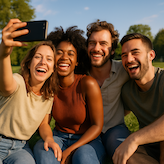
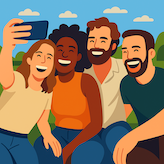
- 入力
- One clear reference image
- 出力
- A simplified flat illustration
- こんな方に最適
- Avatars, teams, explainers, and social art
Original photo / Flat design
See the simplified color system
Drag the divider to compare a group selfie with a flat illustration made from crisp shapes and a limited palette.
Original photoFlat designA focused flat-illustration workflow
Simplify without losing the scene
The preset keeps the subjects, poses, silhouettes, and relationships while reducing photographic detail.
Use crisp color shapes
Controlled blocks of color and minimal shading replace texture, reflections, and noisy backgrounds.
Tune the visual system
Ask for a smaller palette, thinner or absent outlines, geometric faces, stronger contrast, or a simpler background.
How to turn a photo into flat design
Start with the flat-design preset, then adjust the prompt and available generation settings for the intended use.
- 1
Choose a readable composition
Clear silhouettes and separated subjects help the simplified version keep the right people and objects.
- 2
Describe the palette and detail level
Specify brand colors, a limited palette, outline preference, background complexity, and the desired level of facial detail.
- 3
Check simplified features
Review faces, hands, clothing, product shapes, and the number of subjects before publishing.
What flat design changes
- Small features become shapes
- Fine hair, fabric, jewelry, text, reflections, and background objects may be removed or merged.
- The output is a raster image
- The result can look vector-like, but it is not an editable SVG or layered design file.
- Check identity and representation
- Simplified faces and skin tones should be reviewed against the source before the image is shared.
Flat-design conversion questions
- What is a flat-design illustration?
- It uses simplified shapes, controlled color, little or no depth shading, and a clear hierarchy instead of photographic texture.
- Can I convert a group photo?
- Yes. Use a source where each person has a distinct silhouette and visible face, then check the generated count and features.
- Can I use my brand colors?
- Yes. Add the named colors or hex values to the prompt and describe how strongly they should guide the palette.
- Will I receive a vector file?
- No. The workflow generates a raster image with flat-design characteristics, not editable vector paths.
更新されました:
Workflow source: Current ImageStyle reference-image generator.